Configuring UnbelievaBoat
Dashboard
Most of UnbelievaBoat's settings can be set up from the Dashboard. See the Dashboard & Set Up section to learn more.
Changing the prefix
The default prefixes are ! and u!. To change the prefix, use the prefix command. You need the Manage Server permission to change it.
!prefix <new prefix>

- Setting a custom prefix replaces both default prefixes.
- Use
prefix defaultto go back to!andu!. - If you don't know the current prefix, mention the bot instead of using a prefix, for example
@UnbelievaBoat prefix.
The prefix can also be changed from the Dashboard.
Currency symbol
You can change the currency symbol using the set-currency command. This can be an emoji, but the bot must have
access to it, meaning the bot must be in the server the emoji comes from.

Income cooldowns
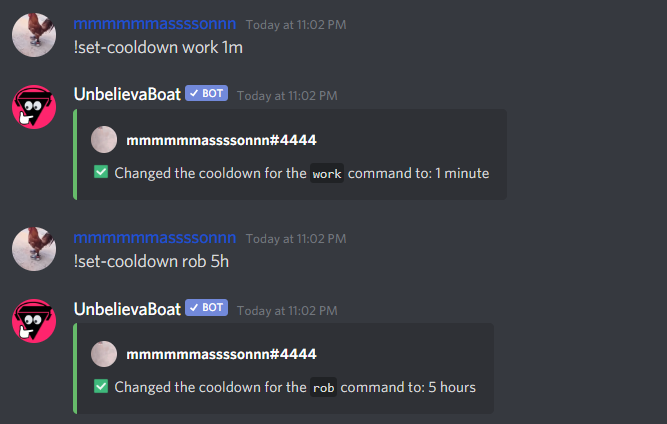
Income commands include work, crime, and rob. You can change the cooldown of each one of these commands with
the set-cooldown command. The minimum cooldown is 30 seconds.
Game cooldowns
Game commands include blackjack, chicken fight, higher or lower, roulette, russian roulette, and slot machine. Use the
set-game-cooldown command to set how many times each game can be played in a set duration.
The limit is counted separately for each game. For example, with the default of 4 uses every 5 minutes, a member can play 4 games of blackjack and 4 games of roulette in the same 5 minutes.

Default settings
Currency
Symbol: 
Chat Money:
Min: 5
Max: 15
Cooldown: 1 minute
Game Cooldown:
Usages: 4 (per game)
Duration: 5 minutes
Game Bets:
Minimum bet: 100
Maximum bet: no limit
Work:
Payout Min: 20
Payout Max: 250
Cooldown: 4 hours
Crime:
Payout Min: 250
Payout Max: 700
Fine Min: 20%
Fine Max: 40%
Fail Rate: 60%
Cooldown: 4 hours
Rob:
Fine Min: same as crime
Fine Max: same as crime
Probability of Failing (cannot be changed): your networth / (their cash + your networth), between 20% and 80%
Cooldown: 1 day
Fines are a percentage of the member's total balance (cash + bank) by default. This can be changed to a fixed amount with the set-fine-type command or from the dashboard.
Resetting everything
The factory-reset command erases all data for the server and cannot be undone. This includes economy balances, role income, store items, inventories, custom replies, moderation cases, permissions, enabled/disabled commands, the prefix, and all other settings.
- Only the server owner can use this command.
- To reset only part of the data, add one of
mod log,inventory,store, orpermissions. For example,factory-reset store.