Slash Commands
Managing permissions
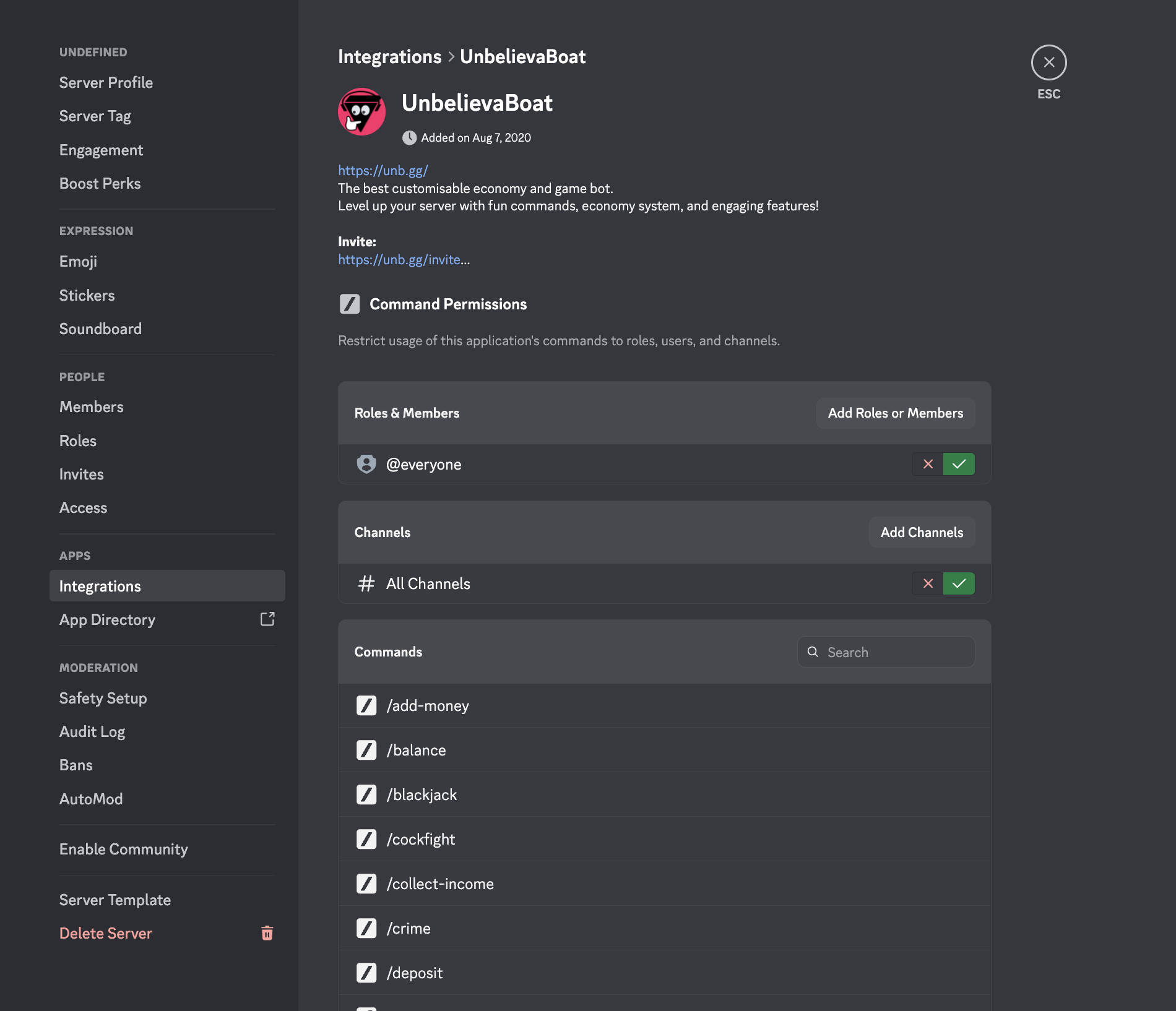
Slash commands use their own permission system, and must be managed separately using Discord's built-in server settings.
The settings can be found in:
Server Settings > Integrations > UnbelievaBoat
- This can only be accessed from the web or desktop Discord client at this time.
Find out more about Discord's permission system here.
Below are issues commonly brought to our attention:
Slash commands are not working
If slash commands aren't working, follow these steps:
- Make sure the command is a slash command
Many commands found on our commands page have not been added as a slash command yet. To use them you will need to use the text command prefix instead (default is!). If the command still does not work, follow these steps. - Make sure members have the "Use Application Commands" permission in the channel
This can be granted from the Discord channel's permission settings. - Check integration settings
On web or desktop Discord only, navigate to your Server Settings > Integrations > UnbelievaBoat to make sure the command was not accidentally denied to your members or to a channel.
Slash commands respond with "This interaction failed"
Before doing anything else, make sure your Discord app is up to date. Next, make sure UnbelievaBoat is online and that Discord is not having issues.
If you still have issues, reach out to us in our support server.
External emoji do not appear properly
Slash commands can only use external emojis if the @everyone role has the Use External Emoji permission. Grant this from Server Settings > Roles.