Fines, bail and taxes
Let police and staff fine members, give jailed members a way to pay bail, and charge regular taxes or rent.
- The
/remove-moneycommand - Store items with requirements and actions
- Role income with a negative amount
Fine a member
Staff can fine a member with /remove-money, adding a reason that's recorded in the money audit log:
/remove-money target:@member amount:500 reason:Speeding fine
- The target can also be a role, to fine everyone in it.
- Choose destination: Bank to take the fine from the bank instead of cash.
By default only members with Manage Server can use /remove-money. To let your police use it, allow their roles in Server Settings → Integrations → UnbelievaBoat. See slash command permissions.
Let jailed members pay bail
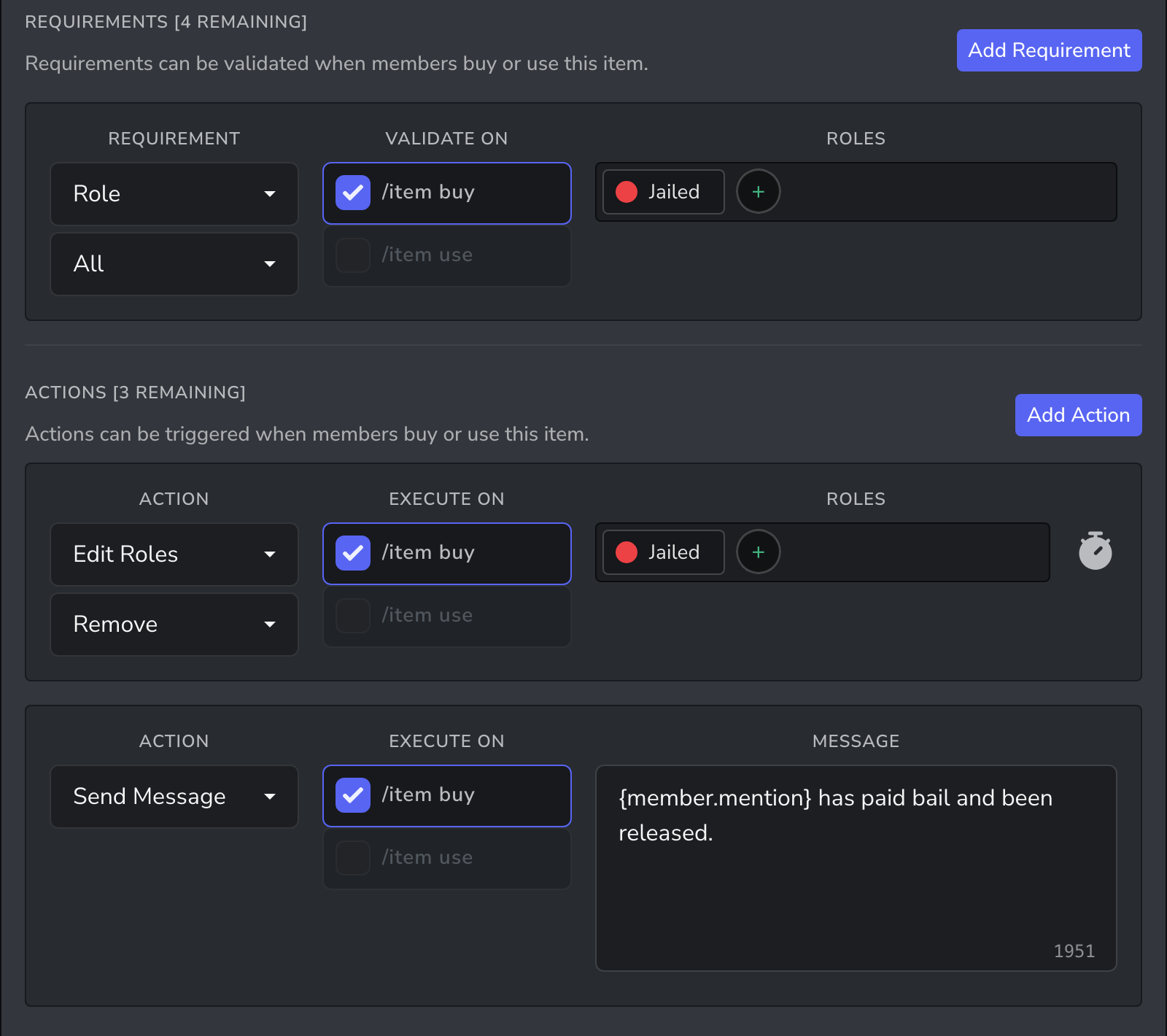
Staff give a Jailed role when someone is arrested. A Pay Bail item lets the member buy their way out.
- In the Dashboard → Store, create a Pay Bail item with the bail amount as its price.
- Turn off Inventory Item.
- Add a Role requirement set to All, with Jailed, so only jailed members can buy it.
- Add an Edit Roles action that removes Jailed on
/item buy. - Optionally, add a Send Message action, such as
{member.mention} has paid bail and been released.
To keep jailed members in a jail channel, set the Jailed role's channel permissions in Discord.
Charge taxes or rent
A role income with a negative amount takes money on a schedule.
| Charge | Role | Amount | Every |
|---|---|---|---|
| Living costs | @everyone | -50 | 1 day |
| Wealth tax | @everyone | -1 with % selected | 7 days |
| Rent | Apartment | -300 | 7 days |
Income for @everyone is automatic and free. Charges for other roles, such as rent, need to be automatic so members can't skip them, which uses an automatic role income slot.
Fines for crime
When crime or rob fails, the member is fined. Set the fine amounts and fail rate in Work, crime, & rob.
Related guides
- Taxes, fees and money sinks: more ways to take money out of the economy
- Licences, permits and vehicles: stop jailed members buying licences