Department salaries and rank pay
Give each department and rank on your roleplay server its own salary, paid daily or weekly.
What you'll use
- Role income, one for each department or rank role
Plan your pay scale
Members receive income for every role they have, so choose how ranks are paid:
| Approach | How it works | Example |
|---|---|---|
| Rank bonus | Members keep their department role, and each rank role adds a bonus on top | Police Officer 800, plus Police Sergeant 400 = 1,200 |
| Full salary | Members only have their current rank role, which pays the whole salary | Police Officer 800, Police Sergeant 1,200 |
Use a rank bonus if your server already gives members their department role plus a rank role.
Set up a salary
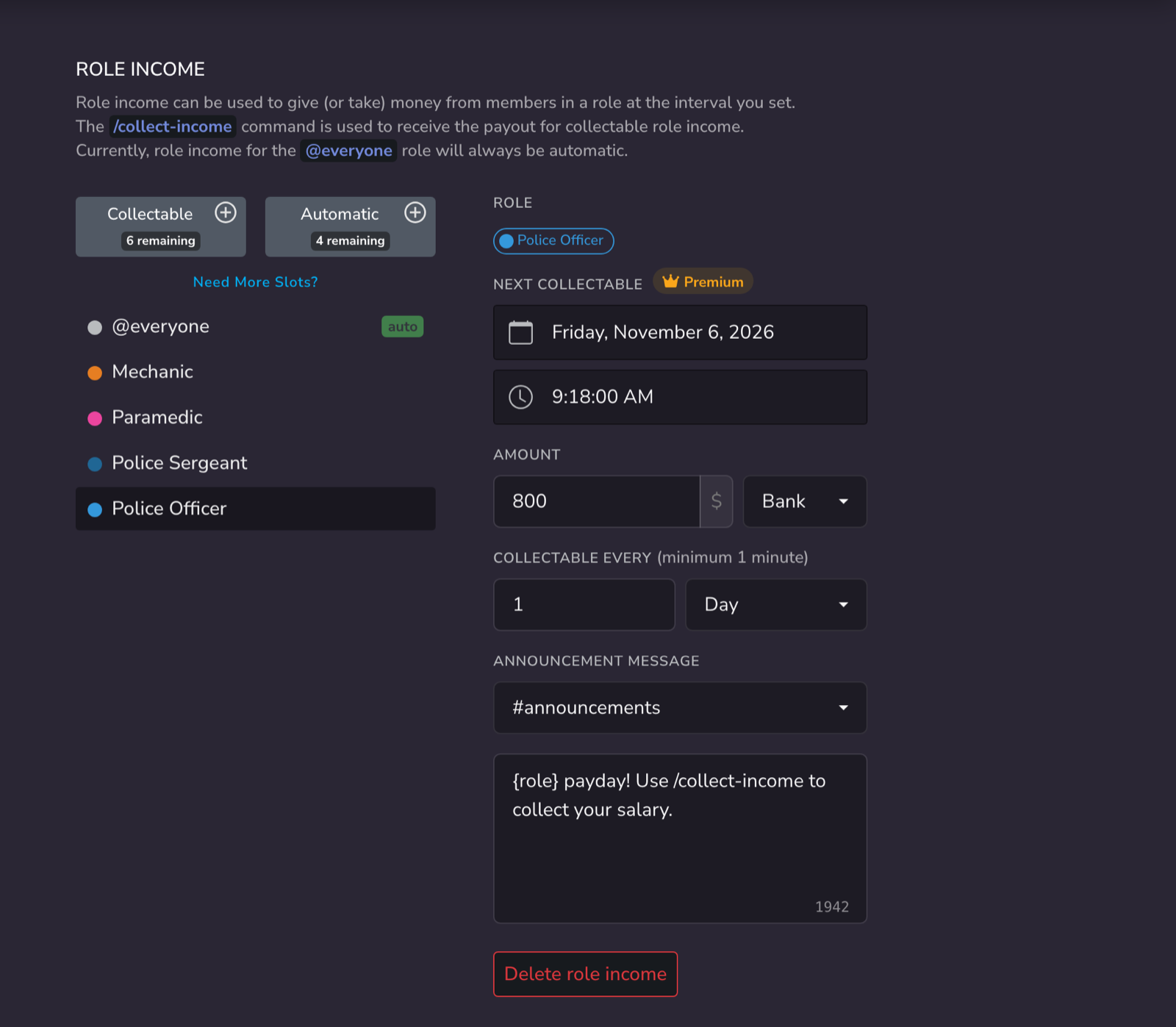
- Open the Dashboard → Role Income.
- Click the + next to Collectable and choose the role, for example Police Officer.
- Enter the salary as the Amount and choose Bank.
- Set it to pay every 1 Day, or every 7 Days for a weekly salary.
- Optionally, choose an Announcement Channel and a payday message, such as
{role} payday! Use /collect-income to collect your salary. - Repeat for each department and rank.
Members collect their salaries with /collect-income.
Collectable or automatic
Collectable salaries only pay members who run /collect-income, so inactive members aren't paid. Free servers can create 15.
Automatic salaries pay everyone with the role without a command. They use automatic role income slots.
Example pay scale
| Role | Salary per day |
|---|---|
| Civilian | 150 |
| Mechanic | 500 |
| Paramedic | 750 |
| Police Officer | 800 |
| Police Sergeant | +400 rank bonus |
Tips
- Pay into Bank, so salaries can't be robbed before members deposit them.
- If you need more than 15 salaries, use a rank bonus for fewer roles, or add role income slots.
Related guides
- Pay members by role: role income for any server
- Job commands: extra pay for working a shift
- Fines, bail and taxes: take some of it back