How do I set up a muted role for the mute command?
To do this, use the muted-role create command. This will create a role in your server called Muted, and sets the
permissions for Send Messages, Add Reactions, Create Public Threads, Create Private Threads, and Send Messages in Threads to  in every channel and category UnbelievaBoat can manage. Ensure other
roles the member has doesn't have these channel permissions set to
 , as this will override the muted role.
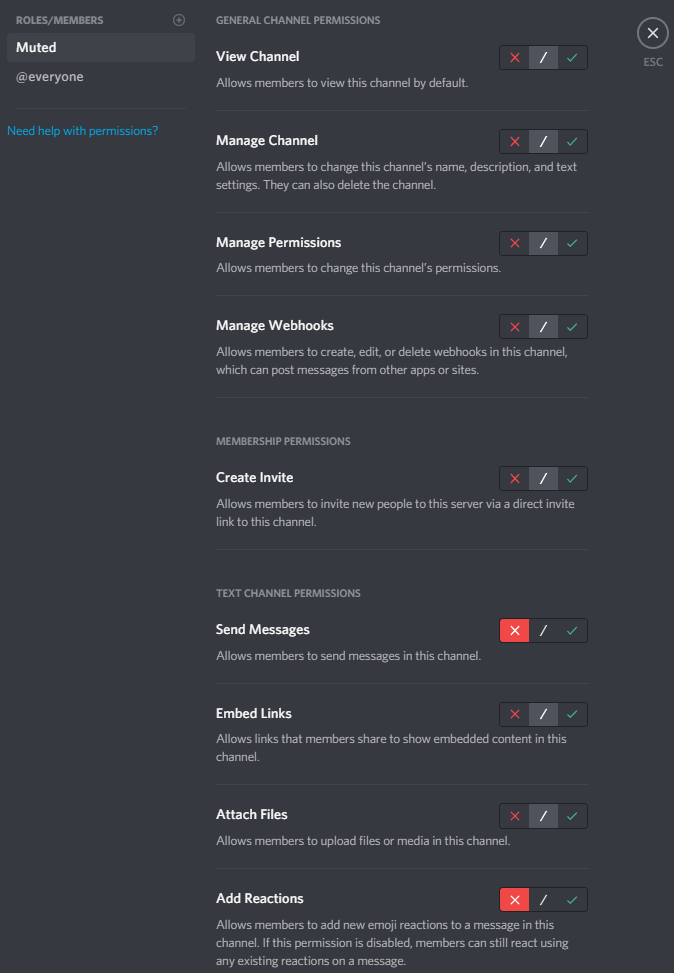
- To use a role you already have, use
muted-role set <role>instead. - Channels created after the role is set up don't get these permissions automatically. Add them to new channels yourself.
- If a muted member leaves and rejoins the server, they are given the muted role again.